
What you need before you start
To follow this tutorial, you need:
- A self-hosted WordPress website (the plugin runs as a WordPress plugin)
- A GetGenie AI account (the free Starter plan works for one or two test posts)
- A clear topic and target audience for your blog post
- Around 30 to 45 minutes of focused time
Time investment: 30 to 45 minutes for a 1,200-word optimized blog post. Skill level: Beginner. No coding or technical SEO background required. Cost: Free plan available with 2,500 AI words per month. Paid plans start at $10/month (annual billing).
How GetGenie AI fits into the writing workflow
Before the steps, it helps to know what GetGenie actually does. GetGenie is an AI SEO writing tool that combines keyword research, competitor analysis, content writing, content optimization, and SEO performance tracking inside a single WordPress plugin. Over 80,000 active WordPress installs use it.
GetGenie includes the following components, each of which plays a role in the workflow below:
- Keyword Research for finding NLP and semantic keywords
- Competitor Analysis for studying top-ranking pages
- One-Click Blog for generating SERP-ready drafts
- Blog Wizard for step-by-step blog creation
- Content Score Panel for optimization suggestions
- GenieChat with 22+ AI personalities
- Genie Image for AI image generation
- SEO Insights for tracking performance after publishing
Support is available in 33+ languages.
Step 1: Install and set up GetGenie AI in WordPress
Time required: 5 minutes

How to install GetGenie AI
- Log into your WordPress admin dashboard
- Go to Plugins then Add New
- Search for “GetGenie AI”
- Click Install Now and then Activate
- A new “GetGenie” menu item appears in your sidebar
- Click it and sign in or create a free account at app.getgenie.ai
- Connect your site by following the on-screen prompts
The free Starter plan activates automatically. It includes 2,500 AI writing words per month plus limited keyword and competitor analysis credits.
Configure your workspace
Before writing, set your defaults:
- Default language (English plus 33+ other languages supported)
- Default tone (professional, casual, conversational, persuasive, etc.)
- Default target audience if you write for one consistent niche
These defaults save time on every future blog post.
Step 2: Run keyword research with NLP and semantic keywords
Time required: 5 to 8 minutes
The biggest mistake new bloggers make is writing first and researching keywords later. With GetGenie’s keyword research, you start the other way around.
How to run keyword research
- Open the GetGenie sidebar inside any post editor
- Click the Keyword Research tab
- Enter a seed keyword related to your topic
- Select your target country and language
- Click Get Keywords
GetGenie returns the following data for each keyword:
| Metric | What It Tells You |
|---|---|
| Search Volume (SV) | Monthly searches for that keyword |
| Competition (Comp) | How hard it is to rank for that keyword |
| Cost Per Click (CPC) | Commercial intent indicator |
| NLP Keywords | Semantically related terms search engines expect on the page |
| Related Keywords | Adjacent topics for internal linking and topical authority |
How to pick your primary keyword
Choose one primary keyword that matches these three criteria:
- Search volume above 100/month (for new sites, target 100 to 1,000 to avoid hyper-competitive terms)
- Competition score low to medium
- Clear search intent that matches what you can actually write about
Save five to eight NLP and semantic keywords. You will sprinkle these naturally through your final draft to satisfy search intent.
Step 3: Analyze competitors and SERP insights
Time required: 5 minutes
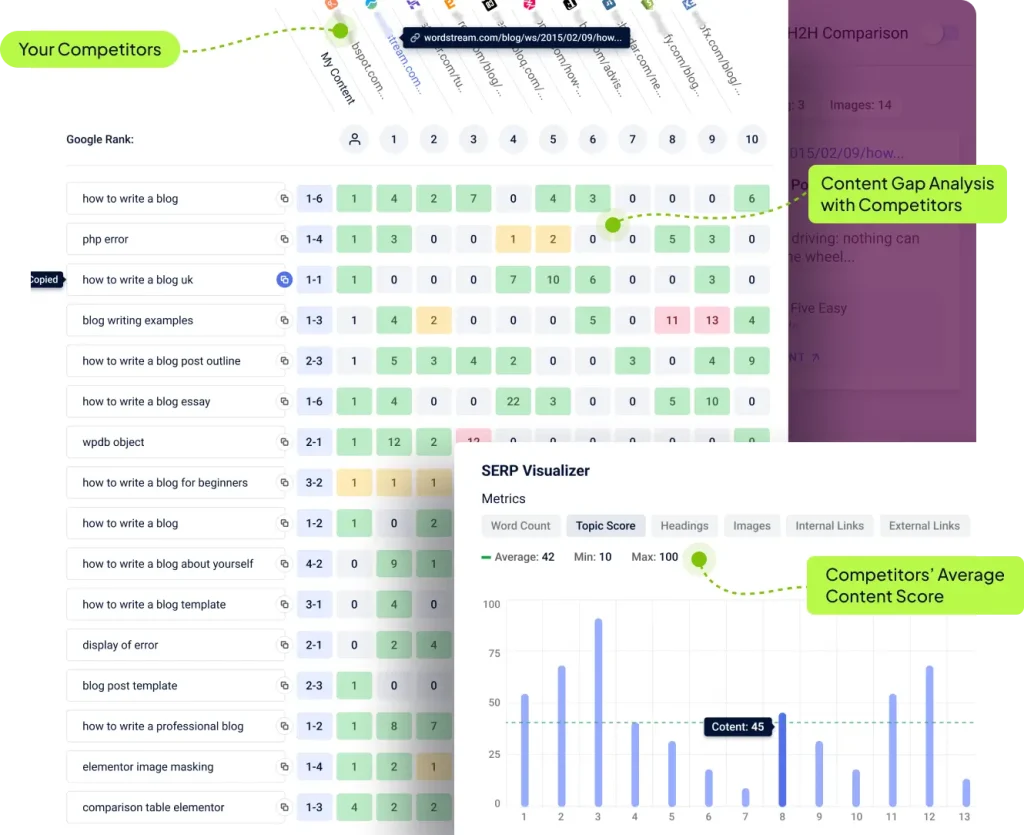
What competitor analysis reveals
GetGenie’s competitor analysis shows the top 10 ranking pages for your target keyword, with the following data for each:
- Total word count
- Heading structure (H1, H2, H3)
- Image count
- Internal link count
- Content score versus your draft
- NLP keyword coverage
How to use this data
Look for patterns across the top five ranking pages:
- Average word count. If the top five average 1,800 words, your target length should be around 1,800 to 2,200 words.
- Common H2 topics. If three or more competitors cover the same subtopics, your article needs to cover them too.
- Heading depth. If competitors use only H2s, you do not need to add deep H3 nesting.
- Image count. Match or beat the average to stay competitive on engagement signals.
Head-to-head comparison
GetGenie also offers a Head-to-Head Analysis view that lets you compare your draft directly against a chosen competitor. Use this once your draft is complete to spot gaps before publishing.
Step 4: Open the Blog Wizard and build your outline
Time required: 5 minutes
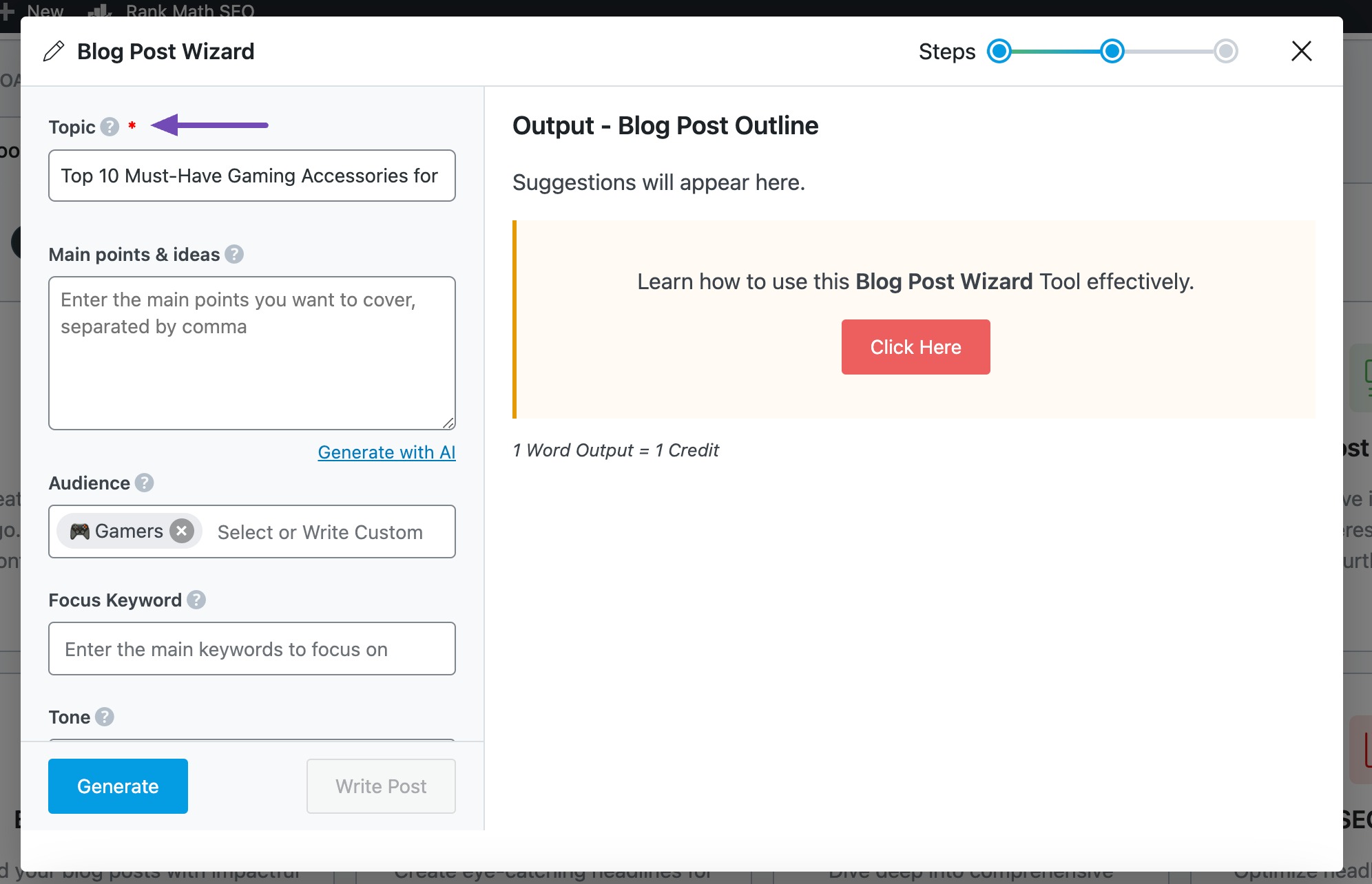
The Blog Wizard is GetGenie’s most powerful writing tool. It walks you through five steps:
- Topic input. Enter your blog post title or topic.
- Keyword input. Paste your primary keyword plus the NLP and semantic keywords from Step 2.
- Tone selection. Pick the tone that matches your brand and reader.
- Outline generation. GetGenie generates a structured outline with an H1, multiple H2 sections, and suggested subpoints.
- Outline editing. Edit the outline before generating the full draft.
Why editing the outline matters
The outline locks in the structure of the whole article. Spending five minutes on the outline saves an hour of rewriting later. Look for:
- Logical section order
- Missing subtopics your competitor analysis revealed
- Sections that overlap or repeat
- A clear introduction and conclusion structure
Edit the outline directly inside the Wizard before moving on.
Step 5: Generate the full draft
Time required: 2 to 4 minutes (generation), 5 minutes (review)
Once your outline is approved, GetGenie offers two writing modes:
Mode 1: One-Click Blog
The fastest option. GetGenie generates the entire blog post in one click based on your outline, keywords, and tone. Typical generation time is 60 to 90 seconds for a 1,500-word post.
Mode 2: Step-by-Step Blog (Genie Mode)
A more controlled option. You generate one section at a time, reviewing and refining each before moving on. Slower but produces more tailored output.
Mode 3: Genie Mode (prompt-based writing)
For paragraphs, intros, or sections that need very specific phrasing, you can prompt Genie Mode directly with your own instructions, similar to ChatGPT.
Reading the first draft
When the draft appears, read it through once without editing. Look for:
- Sections that feel generic or padded
- Claims that need fact-checking
- Statistics or examples that may have been invented (verify all of these)
- Areas where your unique voice needs to be added
A first AI draft is never publishable as-is. The next step is where you make it yours.
Step 6: Optimize with the content score panel
Time required: 10 to 15 minutes
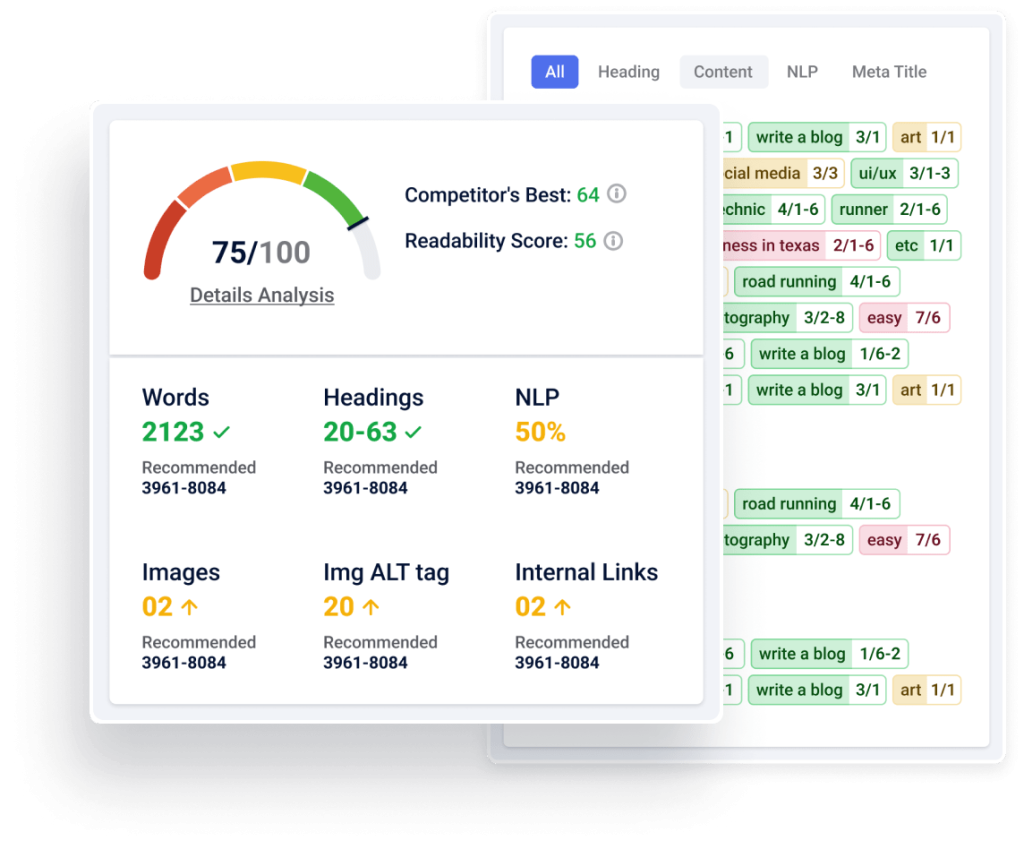
This is where GetGenie’s WordPress integration matters most. The content score panel sits next to your editor and updates in real time.
What the content score measures
GetGenie’s content score (out of 100) reflects:
- Primary keyword usage and placement
- NLP keyword coverage versus competitor pages
- Word count versus the SERP average
- Heading structure
- Image count and alt text
- Internal and external link presence
How to optimize step by step
- Fix keyword usage. Make sure your primary keyword appears in:
- The title (H1)
- The first 100 words
- At least one H2 heading
- The conclusion or last paragraph
- The meta title and meta description
- Add missing NLP keywords. The panel lists NLP keywords you have not yet used. Add them naturally to the body. Don’t force them where they don’t fit.
- Match the target word count. The panel shows the average word count of top-ranking competitors. Aim to match or slightly exceed it.
- Improve readability. Break long paragraphs into 2 to 4 sentence chunks. Use bulleted lists, numbered lists, and tables for scannable answers.
- Add a FAQ section. Adding a FAQ section at the bottom (with question-format H3s) boosts both AEO and content score.
Target score
A content score of 75 or above typically signals a well-optimized article. Scores above 85 are excellent.
Step 7: Add images, schema, and publish
Time required: 5 to 7 minutes
Generate images with Genie Image
Inside the GetGenie sidebar, click Genie Image to generate AI images directly within WordPress. Recommended:
- One hero image (16:9, around 1200×675 px)
- One supporting image per major section
- Descriptive alt text on every image (helps SEO and accessibility)
Add basic schema markup
Use GetGenie’s templates plus a schema plugin (such as Rank Math or Yoast SEO) to add:
- Article schema for the main blog post
- FAQ schema if you included a FAQ section
- How-To schema if your post is a tutorial
Schema is one of the strongest signals for both Google AI Overviews and AI search engines like ChatGPT and Perplexity.
Final pre-publish checklist
- Meta title under 60 characters with primary keyword
- Meta description under 160 characters
- Primary keyword in URL slug
- At least 2 internal links to related posts
- At least 1 external link to an authoritative source
- All images have descriptive alt text
- Content score of 75 or above
- FAQ schema implemented (if FAQ section exists)
- Featured image set
Hit publish.
Realistic time savings: before vs after
Here is a side-by-side comparison for a 1,200-word SEO blog post.
| Step | Without GetGenie | With GetGenie |
|---|---|---|
| Keyword research | 30 to 45 min (Ubersuggest, Ahrefs) | 5 to 8 min (inside WordPress) |
| Competitor analysis | 30 to 45 min (manual SERP review) | 5 min (in-panel) |
| Outline creation | 20 to 30 min | 5 min (Blog Wizard) |
| Drafting | 90 to 120 min | 2 to 4 min generation, 15 min review |
| Optimization | 30 to 45 min | 10 to 15 min (content score panel) |
| Image creation | 15 to 30 min (Canva, stock sites) | 5 min (Genie Image) |
| Schema setup | 10 to 15 min | 2 to 5 min (with helper plugin) |
| Total time | ~3.5 to 5 hours | ~30 to 45 minutes |
The math works out to roughly 3x to 6x faster. The savings come from keeping every step inside the WordPress editor instead of switching between Ahrefs, Surfer SEO, Jasper, Canva, and Google Docs.
Common beginner mistakes
Mistake 1: Skipping the outline review
The outline step locks in your article’s structure. Skipping it means rewriting the whole draft later.
Mistake 2: Publishing the first draft as-is
AI drafts always need human editing for voice, examples, and fact-checking. Plan on 15 to 25 minutes of editing per post.
Mistake 3: Over-stuffing NLP keywords
Adding NLP keywords boosts your content score, but stuffing them where they don’t fit hurts readability and ranks. Add them naturally.
Mistake 4: Ignoring competitor word counts
Writing a 600-word post when the top results average 2,000 words is a structural disadvantage GetGenie’s content score will flag. Match the SERP average.
Mistake 5: Skipping image alt text
Images without alt text hurt accessibility, SEO, and AI search visibility. Always write descriptive alt text.
Mistake 6: Not verifying statistics
AI tools sometimes invent or misattribute numbers. Always verify statistics against the original source before publishing.
Mistake 7: Ignoring the FAQ section
A FAQ section with FAQ schema is the highest-use AEO and GEO improvement you can make. Always include one.
Frequently Asked Questions
How long does it actually take to write a blog post with GetGenie AI?
A 1,200-word optimized blog post takes around 30 to 45 minutes with GetGenie, compared to 3 to 5 hours from scratch. The savings come from doing keyword research, drafting, and optimization inside the same WordPress editor.
Is GetGenie AI good for beginners?
Yes. The Blog Wizard walks you through the process step by step. No coding or technical SEO knowledge is required. The interface uses plain English throughout.
Does GetGenie work outside WordPress?
Yes. GetGenie offers a SaaS Playground for users who don’t run WordPress. The Playground includes the same writing, optimization, and keyword research tools available in the plugin.
What is the difference between One-Click Blog and Step-by-Step Blog?
One-Click Blog generates the entire post in a single click based on your outline and keywords. Step-by-Step Blog generates one section at a time, giving you more control at the cost of speed.
Can GetGenie AI rank my blog posts on Google?
GetGenie improves the signals that help posts rank (NLP keyword coverage, SERP-matched word counts, structured headings, schema readiness). Final rankings still depend on domain authority, backlinks, and content quality. Plan on 30 to 90 days to see ranking movement.
Does GetGenie support languages other than English?
Yes. GetGenie supports 33+ languages including French, Spanish, German, Portuguese, Italian, and Japanese.
How many AI words do I get on the free plan?
The free Starter plan includes 2,500 AI writing words per month plus limited keyword analysis and competitor analysis credits. No credit card is required to start.
What is the difference between Blog Wizard and Genie Mode?
Blog Wizard walks you through a structured five-step blog creation process. Genie Mode is a freeform prompt-based writing tool similar to ChatGPT, useful for shorter sections or custom prompts that fall outside the Wizard’s flow.
Does GetGenie AI help with WooCommerce product descriptions?
Yes. GetGenie includes a WooCommerce Wizard specifically for generating product descriptions, titles, and meta data. It’s one of the platform’s most-used features for ecommerce stores.
Can I track SEO performance inside GetGenie?
Yes. The SEO Insights module tracks ranking changes, captures new and lost keywords, identifies low-performing pages, and breaks down visitor data by device and location.
Does GetGenie use NLP for keyword research?
Yes. GetGenie analyzes top-ranking SERP pages to extract NLP and semantically related keywords that search engines expect to see on competitive pages.
Key Takeaways
- A 1,200-word optimized SEO blog post takes 30 to 45 minutes with GetGenie, compared to 3 to 5 hours from scratch.
- The full workflow has seven steps: install, keyword research, competitor analysis, outline creation, drafting, optimization, and publishing.
- The Blog Wizard is the central feature. It walks beginners through structured blog creation step by step.
- NLP and semantic keywords from the keyword research panel are the single biggest content score booster.
- Always edit the outline before generating the full draft. This is the highest-use moment in the workflow.
- Aim for a content score of 75 or above before publishing.
- The free Starter plan (2,500 words/month) is enough to test the full workflow before subscribing.
Sources and References
- GetGenie AI official website: getgenie.ai
- GetGenie Pricing: getgenie.ai/pricing
- GetGenie Blog Wizard: getgenie.ai/blog-writing-wizard
- GetGenie Keyword Research: getgenie.ai/keyword-research
- GetGenie Competitor Analysis: getgenie.ai/competitor-analysis
- GetGenie SEO Insights: getgenie.ai/seo-insights
- Tutorial reference: GetGenie AI Tutorial: AI Writing & SEO Made Easy in WordPress
- Review reference: GetGenie AI Review: Best AI SEO Writing Tool for WordPress
- Independent review: GetGenie AI Review 2026 (AI Thinker Lab)
Last updated: May 2026. WordPress plugins and AI tools update frequently. Verify current features and pricing on getgenie.ai before subscribing.